It seems that everyone has a podcast these days, and for good reason. According to Edison Research, 55% of Americans aged 12 and above now listen to podcasts monthly. Sure, podcasting may seem like a saturated market, but these digital audio shows still matter in 2026.
As famed podcaster Ira Glass says, “Podcasting is a democratizing force, giving anyone with a message and a microphone the ability to reach a global audience.” Because of this, podcasting has gone mainstream, meaning there’s serious money to be made, and unlike other video-first media, podcasts offer high engagement with its ability to fit into "secondary attention” moments in listeners’ lives. If your interest is piqued and want to know how to start a podcast of your own and get in on the action, keep reading!

How to start a podcast in 2026 • Podcasting essentials
Podcast Definition
What is a podcast?
A podcast is a digital, on-demand series of spoken-word audio episodes focused on a particular topic or theme, like cycling or startups, or telling a specific fictional story.
What are the benefits of having a podcast?
- Reaching a large audience
- Low production and distribution costs
- Establish brand identity and expertise
- Repurpose existing content
- Increase brand awareness and generate leads
- Creating an income stream
How to make a podcast
Why start a podcast in 2026?
Beyond being a low-cast accessible method to express your creativity or add your voice to a larger conversation, podcasting can grow your brand, be it personal or commercial, and establish you as an authority in your field. Furthermore, podcasts allow you to connect with your audience directly, which in turn builds audience ownership outside of third-party platforms like social media.
Given that the global market of the podcasting industry is currently estimated to be valued between $31.5 billion and $39.6$ billion (DemandSage), and it’s projected to grow further, podcasts have the potential lucrative form of income. Plus, there are several ways to monetize one’s podcast – ads, subscriptions, and more – all against low start-up costs. So how do you start a podcast? Especially one that can leverage all the medium has to offer?
How can I start a podcast
How to start a podcast in 10 steps
You may be stuck wondering, ‘how to start my podcast without losing my mind?’ Even though the upsides to podcasting are undeniable, starting a podcast can be overwhelming. That’s why we’ve made the following podcast creation guide with easy-to-follow podcast production steps that will give you a clear and actionable pathway from brainstorming ideas to publishing and promoting your show.
How to start a podcast for beginners
1. Pick your topic and niche
As of March 2026, there are 4.6 million podcasts worldwide in the Podcast Index. So how do you make your podcast stand out? We’ve broken it down below.
Find your “Why”
Your why is your podcast’s thesis statement. Your podcast should cover something you’re passionate about and motivated to explore over the course of dozens, if not hundreds, of episodes. Don't learn podcasting until you've established what you want to talk about first.
According to entrepreneur and podcasting guru Gary Vaynerchuk, “your voice is your brand.” Therefore, consider what makes your viewpoint on a certain topic or niche unique. Ask yourself what you can add to the conversation around your niche topic that doesn’t exist yet.
Research the market
Although passion and a unique POV are important factors for your fledgling podcast, it’s also necessary to make sure the topic you’re building your show around has sustainable demand. That’s where market research comes in.
Research Podcast charts
Check to see what types of podcasts are dominating Apple Podcasts charts, not just overall, but in your category of content. It’s wise to do the same research across Spotify’s podcast categories, since Apple and Spotify are the two leading platforms for podcast listening. Also be sure to look into the search demand for podcasts that are comparable to yours.
Define your target audience
Another facet that can sharpen your podcast’s why and shape it for the market is defining the target audience for your show. Who do you want to speak to?
Podcasts perform well across most of the population. Therefore, once you identify the demographic of your ideal listener, research their listening habits. There's lots of strategy like this involved when learning the podcasting ropes.
Ask yourself the following:
- How and how much do they typically listen to podcasts?
- What types of shows do they seek out that speak to what matters most to them?
- What are the problems they’re looking to solve, or for advice on?
Validate your idea
You have your why, you’ve researched the market, and your demographic. Now it’s time to stress test your podcast idea to make sure it has legs, and that your niche isn’t too narrow. This is how to start a podcast 101. A simple way to do this is to make a quick list of 10–20 episode ideas. If you can’t, it’s time to broaden the scope of your podcast, or look back at your why and research.
If you're still having trouble locking down a niche you're passionate enough about, check out the below video from Think Media about finding the best podcast niche for you!

Finding your niche • How to start a podcast
How to start a podcast for beginners
2. Choose your podcast format
Another great thing about learning how to start a podcast is there are several formats you can build a successful show with. Here’s a quick list with examples of each format:
- Solo Interview: A single host conducting one-on-one interviews with guests. Think The Tim Ferriss Show, How I Built This, Good Hang with Amy Poehler.
- Co-Hosted: Two or more permanent hosts share the banter and responsibilities across every episode, and their chemistry provides the draw for the podcast. Think My Favorite Murder, Call Her Daddy.
- Roundtable: A discussion-style format with multiple who debate, analyze, or riff on a topic together. Unlike co-hosted shows, the "table" changes often. Think Pod Save America, Podcasters’ Roundtable.
- Narrative: A storytelling-driven format where the host or producer crafts a deliberate arc across the series which chronicles a specific event or phenomena. Think Serial, This American Life, Radiolab.
- Nonfiction: This term covers any podcast rooted in real events, real people, and factual information. This includes journalism, true crime, history, science, and documentary-style audio. It also includes interviews and educational shows. Examples: Stuff You Should Know, Hardcore History.
- Fiction: These podcasts are scripted audio storytelling that includes audio dramas and novels. Characters, plots, and worlds are entirely invented. Examples: Welcome to Night Vale, Limetown, The Magnus Archives.
- Hybrid: Why learn how to start podcasting around only one topic? Several podcasts blend formulas. For example, there are shows that mix narrative storytelling with interviews, or use two co-host characters for their fictional premise. The best hybrid podcasts blend formats intentionally to serve the story or topic in ways a single format couldn't. Examples: S-Town, Homecoming.
If you’re struggling to keep all the formats straight, along with their individual pros and cons, check out this video from Done By Lunch that breaks it all down simply.

Picking the best podcasting format • How to start a podcast
How to make a podcast
3. Develop your podcast branding
Now that you’ve got your podcast topic and format. Is it time to start recording? Not quite yet. The best podcasts develop their branding before they get in front of a mic. So before you hit record, consider the following:
Choose a podcast name
A catchy, descriptive, and unique name for your podcast is a must. You want your title not to just be memorable and aligned with the niche or topic your show will speak to, but also to be searchable. This means when someone types in your show name or descriptive terms related to your podcast, it’ll come up among the top results.
Related Posts
Create your podcast artwork
Creating clear and eye-catching artwork for your podcast is nearly just as important as your title. There are specific requirements your show art must meet in order for it to be usable:
Square 1:1 aspect ratio
Dimensions must be between 1400 x 1400 and 3000 x 3000 pixels
A JPG or PNG file under 500 KB
RGB color mode
You want your podcast to provide brand clarity. For example, if you’re working on an upbeat, interview-style podcast, it’s wise to stay away from dark, dreary colors and fonts.
Design for smaller screens
Most people listen to podcasts on a small screen like their phone or tablet. When designing your artwork, make sure that the text and images are large and not overly busy so they’re legible on smaller screens.
Write a compelling show description
The final foundational piece of your podcast branding is your show description. This is a brief, but engaging, thesis statement of what listeners can expect episode-to-episode from your show.
To optimize your description for Search Engine Optimization (SEO), begin writing your description with a clear statement of who the show is for and what they’ll get.
Try to be as specific as possible and include phrases that speak to your topic, niche, format, and any guests organically without keyword stuffing in the blurb.
If you want to dive even deeper into what a brand means and how it can reach people emotionally, check out this enlightening interview from Omar Eltakrori:

Building a podcast brand the right way • How to start a podcast
How to start a podcast
4. Plan your episode structure
Now it’s time to nail down how you’ll structure your podcast episodes. Having a straightforward, set structure across all is essential in keeping your podcast engaging and coherent.
Though how you specifically structure your show is ultimately up to you and may vary by format, we’ve provided a general episode structure for reference.
Introduction
Often pre-recorded and used for every episode of your podcast, much like the episode description. The intro section of your podcast instantly sets the tone for your show through dialogue, music, and sound effects. Typically, it also introduces your host and topic covered across all episodes.
Hook
Unlike your intro, a hook can vary by episode, but it must always answer the question “Why should the listener care about this episode right now?” A few ways to hook your audience is to open with a bold claim, drop the listener into a compelling story moment without initial context, ask a provocative question, or tease the payoff for listening to the entire episode at the top.
Main segments
This is the “meat” of your episode. If you’re doing a non-fiction podcast, this could be the guest interview you’ve promised viewers, the roundtable discussion, a lesson, or a case study. If you’re working on a fiction podcast, your main segment is the continuation of the story you’re telling.
Call to action
Every podcast episode should contain a call to action (CTA). This is a short, straightforward message that offers value to the audience. Common examples include asking for your audience to subscribe to your show, leave a review, follow on social media, or directing listeners to engage with your business.
Outro
Similar to your show’s intro, a podcast outro can be pre-recorded and kept uniform across all episodes. The outro doesn’t need to contain much more than thanking any guests or sponsors, crediting contributors, teasing the next episode, and using a consistent, branded sign-off.
Check out the below table for an example structure template you can use for a 20 to 30 minute episode:
Section | Purpose | Approx Length |
|---|---|---|
Hook | Tease the value of the episode | 15–30 seconds |
Intro | Introduce the show, host, and topic | 30–60 seconds |
Main Segment 1 – Context | Explain why the topic matters | 3–5 minutes |
Main Segment 2 – Core Insights | Deliver the main discussion points | 8–12 minutes |
Main Segment 3 – Examples | Show how listeners can apply or better understand the ideas | 5–8 minutes |
Call to Action | Ask listeners to subscribe, review, visit a link, etc. | 20–40 seconds |
Outro | Wrap up and preview the next | 20-40 seconds |
Depending on what type of podcast you’re making - whether it be a scripted audio drama, an educational deep dive into a popular subject, or even an interview-based show, organizing your thoughts before you hit record is essential.
As you brainstorm those thoughts, StudioBinder's AV scriptwriting can assist you. Jot down all your notes and ideas in the script outline tab, then write a script structured specifically for podcasting all on the same page.
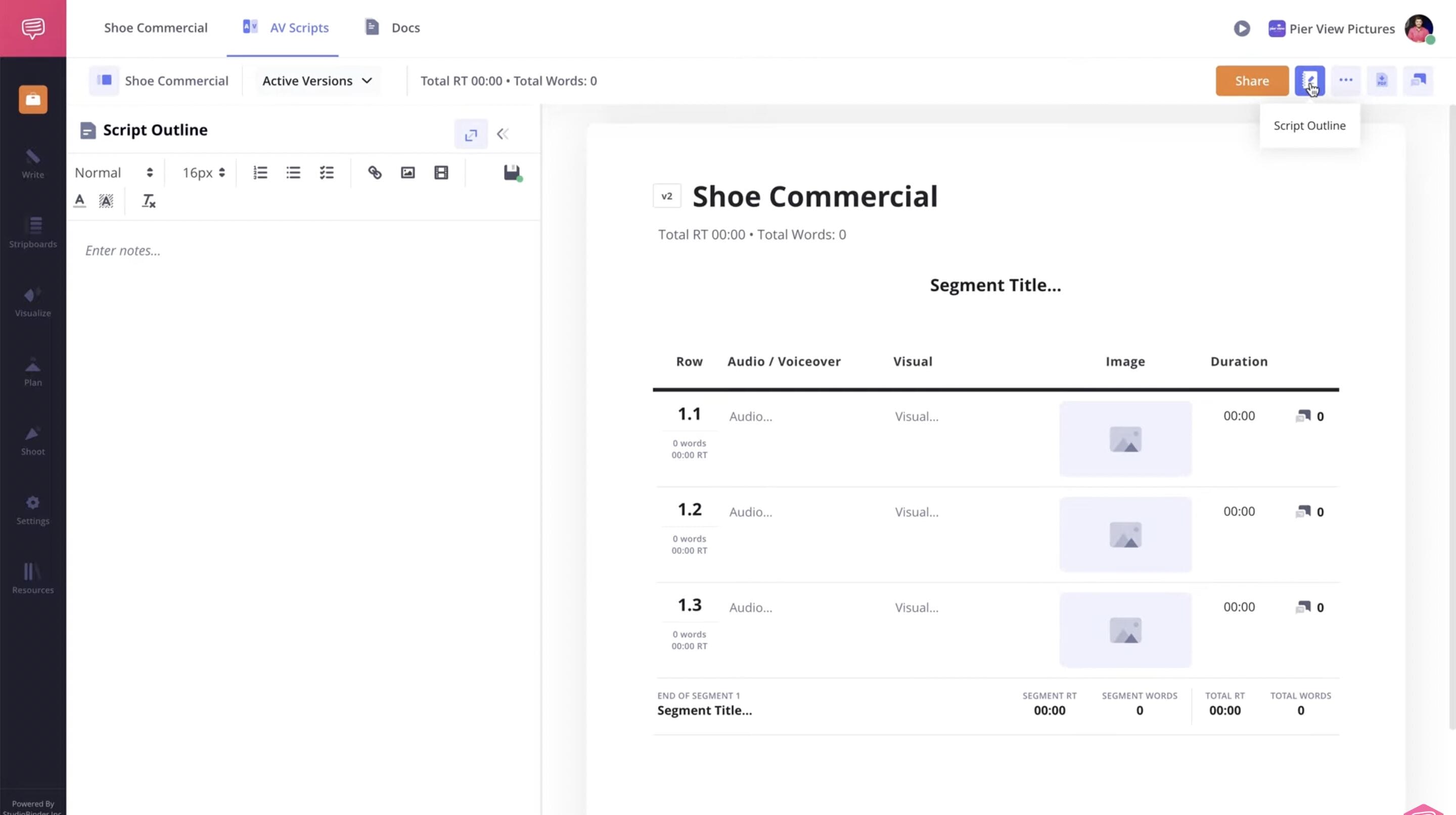
Sample of outline and script on same page • How to start a podcast for beginners
How to start a podcast for free
5. Choose your podcast equipment
The great thing about podcasting is that it doesn’t require massive amounts of equipment. Every podcast needs a microphone, recording device, headphones, and recording software. Yet it’s up to you how much you want to invest in your podcast hosting setup.
Budget-friendly (under $50)
If you’re wondering how to start a podcast for free? Good news, you can. The easiest way to start a podcast is to utilize the several free equipment options and software available to aspiring creators:
Smartphone recording device - a LAV mic can be purchased at a low cost online
Headphones also have low-cost options
Recording software - GarageBand is free for MAC users, and Audacity is free to download and install
Beginner setup ($50-$100)
If you have a little more money to invest in your podcast, there is quality equipment available even at a beginner’s price point:
USB mic: plugs into your computer and elevates sound quality
Headphones: higher–tier headphones still won’t break the bank
Pop filter: can be purchased online at a low cost and improves sound
Free Digital Audio Workstations (DAWs) like GarageBand and Audacity work well, but low-cost option Reaper offers a step up
Professional setup ($200+)
If you’re in search of a professional setup, your podcast studio should have:
XLR mics are the industry standard
Audio interface for mixing live and layering in sound effects or calls live
A boom arm to keep your mic stable and steady
Video equipment to increase your scalability and earning potential
Lighting setup so the video component of your podcast appears polished and professional
Need even more up to date advice on how to choose the best podcast recording software? Look no further than Think Media's video breakdown:

All the recording software you need • How to start a podcast for beginners
How to start a podcast
6. Select recording & editing software
After you’ve assembled your equipment, you need to identify what podcast recording software you’ll use. Similar to the range of equipment available, there are several options for recording and editing software based on your budget and needs.
Recording software options
Given the boom podcasting underwent, there are several recording software and DAWs for you to choose from. Most common are Audacity and GarageBand, as they’re free to install and cover all the basic needs for recording. Riverside and Zoom are also popular options if you’re looking to make a “vodcast” or video podcast, since they have built-in video recording.
Editing software options
All podcasts require some editing, whether it’s as simple as adding in a pre-recorded intro and outro to every episode, fixing the audio levels, or cleaning up interviews and performance. Therefore, you should be familiar with how much editing your show will require up front so you know what editing software is right for your podcast.
Related Posts
Need help figuring it out? Check out our breakdown below:
Category | Beginner Podcast Editing Tools | Professional Podcast Editing Tools |
|---|---|---|
Typical Software | Audacity, GarageBand, Descript, Alitu | Adobe Audition, Pro Tools, Reaper, Hindenburg Journalist |
Core Editing Features | Basic trimming, noise reduction, simple multitrack editing | Advanced multitrack editing, spectral repair, mastering tools |
Automation / AI | AI transcription, automatic filler-word removal, auto-leveling in some tools | Advanced automation, plugins, batch processing |
Customization | Limited effects and plugin support | Highly customizable with plugins, routing, and effects chains |
Workflow Speed | Faster for simple edits but limited scalability | Faster for complex productions once mastered |
Best For | First podcast, solo creators, simple interview shows | Professional podcasts, narrative shows, studios, networks |
Learning Curve | Low to moderate | Moderate to high |
How to start a podcast on Spotify
7. Record your first episode
It’s time to start recording! Before you hit that record button, follow these tips to make the most of every session.
Prepare your recording space
Why do so many people record audio in their closets? Because fabric absorbs echo and other sounds, allowing for better audio.
To further reduce echo during your podcast recording, try to record in a smaller room and avoid spaces with hardwood floors or high ceilings.
How to get clean audio without echo
Hanging curtains, blankets, or moving pads on bare walls also helps to reduce echo, and even a recording on a carpet or putting a blanket under your mic can make a difference.
Investing in a dynamic mic that’s designed to pick up less room noise is also helpful rather than a condenser mic.
Recording best practices
When it comes to speaking into the mic, station yourself about 4-8 inches away from your recording device for the best quality audio. For levels, aim for peaks around -12 dBFS to -6 dBFS, which is enough headroom to avoid clipping while keeping the signal strong
Your average (RMS) level should sit around -18 dBFS to -14 dBFS during normal speech. Never let your levels hit 0 dBFS, as digital clipping is permanent and cannot be fixed in post.
And try as we all might, technical issues happen. Therefore, follow the 3-2-1 rule in backing up your work. Keep 3 copies of every recording (your original, a local backup, and an offsite/cloud backup). Store your copies on 2 different media types (like an internal drive and external drive). Then keep 1 copy offsite (cloud storage satisfies this easily).
Recording remote interviews
Many interview podcasts will have their guests join them remotely. We recommend The Double-Ender Method, where both the host and guest record their own audio locally on their own machine simultaneously to act as a backup and smooth over any connectivity issues that may occur.
Always use a wired ethernet connection during your remote recording session, as wifi drops cause audio glitches that can't be fixed later. Closing all background apps (browsers, Slack, email) help to free up bandwidth and CPU to reduce any glitches or lags. Also, making sure both you and your guest use headphones or earphones keeps each participant’s audio clean and prevents any bleed.
Trusted by over 1M creatives
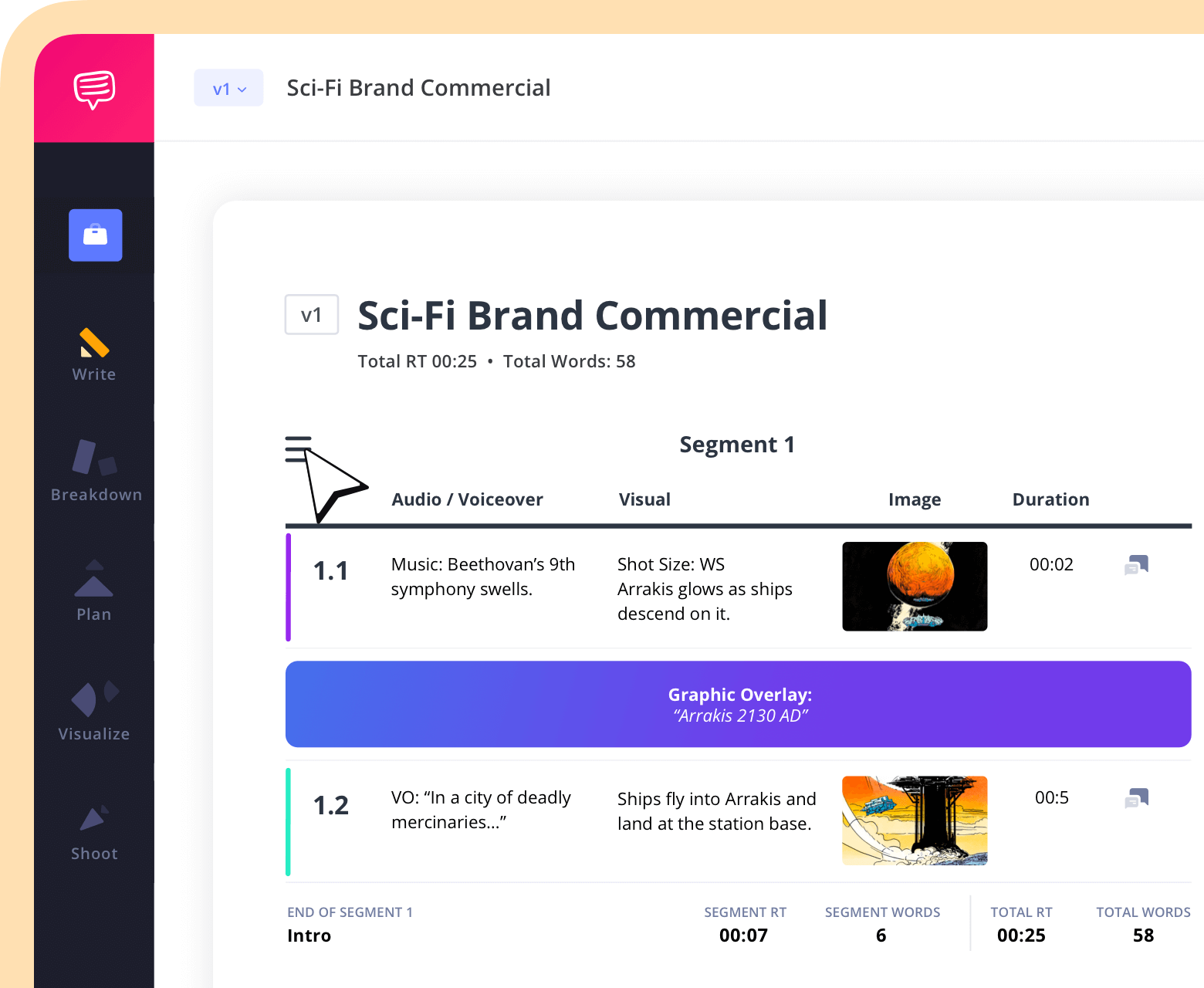
AV scripts with built-in timing
Write in two-column format, track runtime, and share with version control
How to start a podcast and make money
8. Edit your podcast
We can walk you through podcasting, but it’s up to you how much or how little you want to edit your podcast. Yet however much refining you do, edit with a goal in mind. What do you want the main takeaway from this lesson, guest, or chapter of storytelling to be? Use the answer to that question to create an editing outline that prioritizes timing and pacing.
At the bare minimum, you should remove any filler that slows down your episode. Add compression and equalization (EQ) lightly to balance out your audio levels so the entire episode has a coherent volume and sound.
Create a signature intro and outro
A consistent part of your episode editing should include adding your podcast’s signature intro and outro. These will be the first and last things your listener hears, so put a significant amount of thought into how your personal or business’s branding will be incorporated.
Using music makes for a catchy podcast intro. Although many popular songs are expensive to license, there are many royalty-free and stock music libraries at your disposal. Meanwhile, honing in a clear call-to-action that both new and seasoned listeners can do makes for an effective outro.
Create your podcast trailer
A podcast trailer is a quick 30 to 60 tease of the niche and tone of your show. It could be the host directly telling the audience what to expect from the upcoming podcast, as well as using clips from future episodes to tease and entice potential listeners to tune in and subscribe.
A snappy podcast trailer is an important pillar of your show’s launch strategy. It builds interest, engagement, and hype to get your first episode as many listeners as possible.
Want a step-by-step, simple as possible (yet highly effective) approach to editing your podcast? Think Media once again has the goods:

How to edit your podcast • How to start a podcast on easy mode
How to start a podcast on Spotify
9. Publish and distribute your podcast
You’re almost ready to share your podcast with the world! However, there’s still a few more steps to go and decisions to be made.
Choose a podcast hosting platform
While you may listen to a podcast on Apple Podcasts or Spotify, the show itself needs to be hosted on an external platform. The podcast hosting service then generates a Really Simple Syndication or RSS feed that will automatically update your show’s new episodes once it’s been accepted by podcast distributors or “podcatchers” like Apple and Spotify.
Some podcast hosting platforms like RSS.com and Spotify for Creators offer free plans. But if you want to access your show’s analytics and other features to grow your show, you’ll likely have to pay for a plan. There are plenty of podcast hosting services out there with different options, so you can choose the right one for your show and budget.
Submit to directories
Once you’ve uploaded your podcast to a hosting service and generated your RSS feed, the next step is publishing to directories, or the “podcatchers” mentioned above. To optimize audience growth and monetization, below are the major directories you should your submit RSS feed to:
Apple Podcasts
Spotify
Amazon Music
YouTube Podcasts
Each directory has its own requirements, so be sure to follow the steps carefully. Also, be aware that approval by these directories can take anywhere from 3-7 days.
Trusted by over 1M creatives
AV scripts with built-in timing
Write in two-column format, track runtime, and share with version control
How to start a podcast and make money
10. Launch, promote, and monetize your podcast
You've learned the podcasting ropes and now your podcast is ready for listeners. But there are already millions of podcasts out there, so how do you cut through the noise? That’s where creating a launch strategy and promotion comes in.
Develop your launch strategy
Announce your podcast early – whether it be in the press, on social media, to your email list to create interest in the show. Even if you’re still editing episodes, uploading your podcast trailer to your RSS feed about 2-4 weeks before your official launch gives you enough time to submit to the major directories and get approved, as well as for your show to be indexed and become searchable online.
When you officially launch, start with three episodes instead of one. Even if you only plan to produce one new episode a week afterwards, launching with multiple episodes helps your standing in podcast directories, and is a proven way to increase your chances of making Apple’s “New & Noteworthy,” which can be a major boost to your show. Furthermore, launching with three episodes increases binge behavior, demonstrates consistency before you’ve proven it, and filters for your core listener base.
Discover your promotional channels
'How to start a podcast' goes far beyond your own podcast channel. There are several other ways to promote your podcast beyond a trailer and launch strategy. Having a social media account for your podcast and posting clips from your episodes helps drive listeners to your show, along with email blasts.
Guest cross-promotion, asking those who have been on your show to share about their involvement, is also crucial for new podcasts to build momentum. People may not know your show, but they may know your quest, and will tune in.
Another major promotional tool for your podcast is your shownotes. By optimizing them for SEO, your podcast can rank higher searches and bring in listeners who might not have found you in a podcast directory or on social media.
Related Posts
Podcast SEO basics
Optimizing your podcast to rank higher both in directories and in search engines in general is simpler than it may seem. Choosing the most specific category possible on directories can help boost you on their platforms. While tools like Google's free Keyword Planner, Ubersuggest, or even just Google's autocomplete suggestions provide insights on what people actually search for and keywords that pertain to your show.
From there, try to include a descriptive keyword into your show’s title, like "Frame by Frame: A Filmmaking Podcast" beats just "Frame by Frame". The same principle goes to episode titles – describe what the listener will learn or hear, not just the guest's name or a general descriptor. For your shownotes, the first sentence should summarize the episode value with a keyword. Be sure to mention guest names, tools, techniques, and topics discussed in your description, as they’re indexable, and searchable.
Most importantly, write for your ideal listener first, search engines second. Podcasts that keyword stuff don’t only turn off human audiences, directories penalize for it as well.
Including transcriptions for your podcast episodes is also important. Since a search engine can’t actually listen to your show, the transcript gives Google thousands of indexable words that can match search queries your title alone never would. Furthermore, embedding your RSS feed on your business or your personal website means listeners can play the episode without leaving your domain, and all the engagement signals — time on page, return visits, page depth — accrue to your website's authority. This prevents the podcast directories from getting all the SEO advantage from your show. These are the more complex nuances of podcasting.
Monetization options
Including ads on your podcast may be the most obvious way to monetize your show, but there are several other methods to make money from podcasting. In fact, most sustainable podcast businesses typically combine 2–3 income streams rather than relying on any single one.
There’s direct listener support, where you can use outside platforms like Patreon or Supercast to offer community access or ad-free and bonus content. Podcast directories like Apple Podcasts and Spotify now allow you to offer paid tiers directly inside their apps for premium content, but they take a cut of the profits.
Advertising and sponsorships typically become viable once you reach 1,000 to 2,000 downloads per episode, which is the threshold most sponsors use as a minimum. Host-read ads are the most effective type of advertising since listeners know and trust their voice, and platforms like Podcorn and Advertisecast help podcasters find sponsors beyond directly reaching out to brands. Affiliate marketing is another similar avenue, and often doesn’t require as big of an audience, just a highly engaged one.
Finally, selling your own products and services via a podcast is one of the strongest reasons for creating one in the first place. Podcasts help you and/or your business craft authority and expertise in your niche topic. That makes it more likely a listener will buy your courses, consultations, workshops, books, guides, or tickets to an event you’re putting on when you promote it on your show. Also, branded merchandise for your podcast can also bring income once you create a community identity around your show.
Want to expand some more on your podcast money making options? Podcasting with Hiwi G has you covered with the informative video below:

How to monetize a podcast • Podcasting made easy
How to start a podcast for free
How much does it cost to start a podcast?
Startup costs for a podcast vary greatly. Let’s break it all down by price point:
Free
- Microphones: Phone built-in mic or earbuds mic
- Headphones: Any wired earbuds you already own
- Software/DAW: Audacity (free) or GarageBand (free, Mac) for recording and editing
- Hosting: Spotify for Podcasters (Anchor)
- Remote Recording: Zoom (free tier) or Google Meet
- Studio Space: Record in a closet or hang blankets on walls
- Mic Stand: Stack books to prop up your phone or mic
- Pop filter: DIY pantyhose stretched over a wire hanger
- Shownotes: Anchor/Spotify auto-generated show notes page
- Music & Sound Design: YouTube Audio Library (free, royalty-free)
$100 Setup
- Microphones: Samson Q2U (~$60) or Audio-Technica ATR2100x (~$79)
- Audio interface: Built into USB mic or Focusrite Scarlett Solo (~$120)
- Headphones: Sony MDR-7506 (~$80) or Audio-Technica M20x (~$49)
- Recording Software & DAW: Audacity (free) or Descript (~$24/mo)
- Hosting: Buzzsprout ($12/mo) or Podbean ($9/mo)
- Remote Recording: Zencastr (free tier) or Riverside.fm (~$15/mo)
- Studio: Foam panel pack (~$30) + desk mat (~$15)
- Mic Stand: Boom arm (~$20–$35) such as the Rode PSA1 dupe
- Pop filter & Windscreen: Pop filter (~$10) or foam windscreen (~$8)
- Shownotes & Website: WordPress.com free or Card (~$19/yr)
- Music & Sound Design: Epidemic Sound (~$15/mo) or Artlist (~$199/yr)
- Additional Editing Software: Descript (~$24/mo) — transcript-based editing
$500+ Setup
- Microphones: Shure SM7B (~$360) + audio interface (~$120)
- Audio interface: Focusrite Scarlett 2i2 (~$160) or Rodecaster Pro II (~$699)
- Headphones: Beyerdynamic DT 700 Pro X (~$299) or Sony MDR-7506
- Recording Software & DAW: Adobe Audition (~$55/mo) or Hindenburg Pro (~$399/yr)
- Hosting: Transistor ($19/mo) or Captivate ($17/mo)
- Remote Recording: Riverside.fm Pro (~$29/mo) or Squadcast (~$20/mo)
- Studio: Acoustic panels (~$150–$300) + reflection filter (~$80)
- Mic Stand: Rode PSA1+ (~$99) or Elgato Wave Arm (~$99)
- Pop filter & indscreen: Stedman Proscreen XL (~$80) or metal mesh filter
- Shownotes & Website: WordPress self-hosted (~$5–15/mo) or Squarespace (~$16/mo)
- Music & Sound Design: Custom theme commissioned (~$200–$500 one-time)
- Additional editing software: Auphonic (~$11/mo) + Adobe Audition or hire editor
Category | 🟢 FREE TIER $0 setup cost | 🔵 $100 SETUP | 🟣 $500+ SETUP |
|---|---|---|---|
Microphone | Phone built-in mic or earbuds mic Surprisingly usable in quiet, treated spaces | Samson Q2U (~$60) or Audio-Technica ATR2100x (~$79)
| Shure SM7B (~$360) + audio interface (~$120) Industry standard; needs preamp with enough gain |
Audio Interface | None needed (USB mic or phone) Skip entirely at this tier | Built into USB mic or Focusrite Scarlett Solo (~$120)
| Focusrite Scarlett 2i2 (~$160) or Rodecaster Pro II (~$699)
|
Headphones | Any wired earbuds you already own Must be wired — wireless adds latency | Sony MDR-7506 (~$80) or Audio-Technica M20x (~$49)
| Beyerdynamic DT 700 Pro X (~$299) or Sony MDR-7506
|
Recording Software (DAW) | Audacity (free) or GarageBand (free, Mac)
| Audacity (free) or Descript (~$24/mo)
| Adobe Audition (~$55/mo) or Hindenburg Pro (~$399/yr)
|
Podcast Hosting | Spotify for Podcasters (Anchor) — free
| Buzzsprout ($12/mo) or Podbean ($9/mo)
| Transistor ($19/mo) or Captivate ($17/mo)
|
Remote Recording | Zoom (free tier) or Google Meet Enable 'original sound' in Zoom audio settings | Zencastr (free tier) or Riverside.fm (~$15/mo)
| Riverside.fm Pro (~$29/mo) or Squadcast (~$20/mo)
|
Acoustic Treatment | Record in a closet or hang blankets on walls Free and genuinely effective; clothes absorb echo | Foam panel pack (~$30) + desk mat (~$15)
| Acoustic panels (~$150–$300) + reflection filter (~$80)
|
Mic Stand / Arm | Stack books to prop up your phone or mic
| Boom arm (~$20–$35) such as the Rode PSA1 dupe
| Rode PSA1+ (~$99) or Elgato Wave Arm (~$99) Smooth articulation, cable management built in |
Pop Filter / Windscreen | DIY: pantyhose stretched over a wire hanger
| Pop filter (~$10) or foam windscreen (~$8)
| Stedman Proscreen XL (~$80) or metal mesh filter
|
Show Notes / Website | Anchor/Spotify auto-generated show notes page
| WordPress.com free or Carrd (~$19/yr)
| WordPress self-hosted (~$5–15/mo) or Squarespace (~$16/mo)
|
Music / Sound Design | YouTube Audio Library (free, royalty-free)
| Epidemic Sound (~$15/mo) or Artlist (~$199/yr)
| Custom theme commissioned (~$200–$500 one-time)
|
Editing / Post-Production | Audacity (free) — manual editing Time-consuming but capable; good for learning | Descript (~$24/mo) — transcript-based editing Edit audio by editing text; huge time saver | Auphonic (~$11/mo) + Adobe Audition or hire editor
|
How to start a podcast
Common podcasting mistakes to avoid
The best podcasts focus on clarity, consistency, and giving value to their listener rather than how many subscribers they can get, or how much they can sell with their show. As you increase your knowledge on podcasting, make sure you avoid these common podcasting mistakes:
- Poor audio quality
- No episode structure
- Inconsistent release schedule
- Weak hook
- Overly long intros
- No episode editing
- No clear audience
- No SEO or shownotes
- No call to action
To expand even further, we're going to let The Podcast Haven take it from here and give you the eight most common podcast mistakes you'll really want to keep an eye out for:

8 common podcast mistakes • How to start a podcast
Podcast starting
Tools & Resources
We’ve taken you step-by-step through the process of starting a podcast. Now that you’re familiar with the nuances of the medium and what it requires, we’ve organized the ultimate cheatsheet of tools and resources for quick reference:
Podcast Planning Templates
As the old adage goes, preparation is the key to success. Anyone who knows the ins and outs of how to start a podcast can tell you this. Check out the below template examples that will keep your podcast organized and on schedule.
Podcast episode outline template (the outline could be made within SB here that we provide).
Podcast launch checklist (could be share link to Docs)
Podcast content calendar (studiobinder calendar)
Podcast guest outreach template
Podcast Equipment Starter List
Podcasting doesn’t require the most expensive equipment to make a quality show. Below, we’ve listed the necessities for each budget range that you may be starting out with.
For a beginner setup:
USB microphone (Audio-Technica ATR2100x)
Closed-back headphones
Pop filter Basic boom arm
For an intermediate setup:
XLR microphone (Shure SM7B)
Audio interface (Focusrite Scarlett)
Acoustic panels
Adjustable mic stand
Podcast Recording & Editing Software
There are two major types of software you’ll need for your podcast –one for recording your audio and one for editing it. Here are are few of the best and most accessible applications for each category:
Recording Software:
Riverside
Zoom
SquadCast
Zencastr
Editing Software:
Audacity
GarageBand
Adobe Audition
Descript
Software like Zoom, Zencastr, Audacity and GarageBand all offer free options and are friendly for beginners. They'll really assist you as you learn how to start a podcast. For those looking to invest in an intermediate or professional set-up, Riverside, SquadCast, Adobe Audition, and Descript are industry-standard for podcast production.
Podcast Hosting Platforms
Your podcast needs to be hosted on an external platform that can generate an RSS feed, which is how listeners and podcast directories access your show. There are many podcast hosting platforms out there, many of which offer free, or low-cost hosting solutions.
Popular hosts:
Buzzsprout
Spotify for Creators
Libsyn
Transistor
Podbean
Once your podcast has its RSS feed generated by your hosting platform, you can then submit your feed to all the major podcasting distributors, or “podcatchers” like Spotify, Apple Podcasts, and more.
Frequently Asked Questions
How to Start a Podcast FAQs
Most beginners can launch in about a month depending on preparation and editing time. Planning your niche, recording 2–3 episodes in advance, and setting up hosting are the biggest time investments. You should announce your podcast about 2-4 weeks with a trailer before the first episode releases to build hype, be accepted by the major podcast directories, and have your show indexed.
Yes. You can record using the mic on your smartphone, improvise equipment with DIY solutions, and edit with free software like Audacity or GarageBand. You may still need to pay hosting to distribute your podcast to major platforms, but RSS.com and Spotify for Creators have free plans.
No. Most podcasts grow after launch through consistent publishing and promotion. Focus on serving a specific niche rather than attracting everyone. Crafting show and episode titles, as well as all descriptions for SEO can help people find your show who may otherwise wouldn’t have.
Choose a topic that balances personal passion with ongoing audience interest. Ideally, test with at least 10 potential episode ideas to ensure “talkable” content over time. Researching the market of podcasts that already exist in that niche and defining your target audience can also help your home in on your podcast topic.
No. Many beginner podcasters start with budget-friendly USB mics that cost less than $100 and free editing software. There are also DIY solutions like making your own mic stand, pop filter, and recording in a closet full of clothes that improve your audio inexpensively. Audio quality improves with practice before investing in pro gear.
Episode length depends on format and audience expectations but aim for clear, engaging content rather than arbitrary time targets. Common lengths range from 20–40 minutes for interviews and 10–20 for solo episodes. It’s recommended to launch your podcast with three episodes to improve your ranking on podcast platforms and searchability, plus it encourages binge-listening.
Publish via a hosting service that distributes your show to major directories like Apple Podcasts, Spotify, and Amazon Music to maximize reach. There are several free or low-cost hosting services for podcasts that also offer performance analytics and other helpful features for audience growth.
Use SEO-optimized show notes, social media teasers, guest cross-promotion, and listener newsletters to grow your audience. You can also pitch a podcast collab with another show in your similar niche, as well as pitch your show to relevant publications.
UP NEXT
The Best Filmmaking Podcasts
We’ve answered the question, “How do I start my podcast?” Now it’s time to get inspired and research the market. In our next post, we’ve put together the best filmmaking and screenwriting podcasts to further support your craft. There’s something to learn not just about filmmaking, but about what makes a successful podcast in each of the shows we’ve spotlighted.
Up Next: The Best Filmmaking Podcasts →